Fork Template & Generate Wallet
Estimated time: 5 minutes
Fork Template & Generate Wallet
Learning Objectives
By the end of this step, you'll:
- Have forked the starter template
- Generated your own wallet for the Arkiv testnet
- Be ready to set up your environment
Content
What is the Starter Template?
The starter template is a minimal Next.js app that demonstrates:
- Reading data from Arkiv
- Writing data to Arkiv
- Handling transactions and errors
Think of it as your "hello world" for decentralized apps.
Important: When you fork this template, you get a complete, standalone app that runs independently. It includes its own API routes and communicates with other apps only through Arkiv (the blockchain), not through direct HTTP calls. This means your app can work completely on its own - no central server or external dependencies needed!
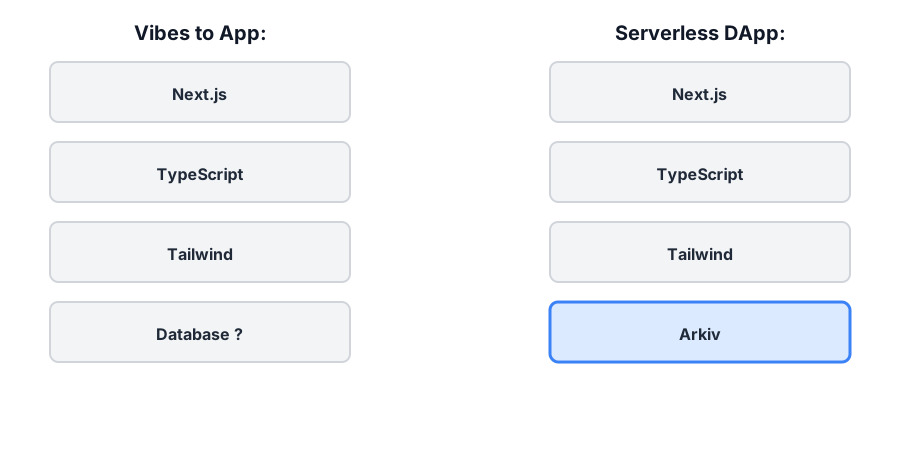
This visual shows how Arkiv fits into the familiar development stack. Instead of PostgreSQL, MongoDB, or Firebase, you use Arkiv, a decentralized database that stores data on the blockchain. The query interface feels familiar, but the data lives on-chain.
I'm at step 2: Fork Template & Generate Wallet.

Help me:
1. Fork the arkiv-hello-world repository on GitHub: https://github.com/understories/arkiv-hello-world
2. Clone it locally using: git clone https://github.com/YOUR_USERNAME/arkiv-hello-world.git
3. Generate a new wallet for Arkiv testnet (Braga) using the official Arkiv Getting Started guide at https://arkiv.network/getting-started/typescript
4. Copy my wallet address and private key from the interactive account generator
5. **PAUSE HERE** - When you reach the step of getting testnet tokens, you must pause and have the human complete the faucet step manually. Display the wallet address that was generated in step 4, and provide clear instructions: "I've generated your wallet address: [WALLET_ADDRESS]. Now you need to get testnet tokens by visiting the Braga faucet. Please: (1) Go to https://braga.hoodi.arkiv.network/faucet/, (2) Paste your wallet address [WALLET_ADDRESS] into the 'Wallet Address' field, (3) Complete the Proof of Work CAPTCHA, (4) Wait for the tokens to arrive (you'll receive test GLM tokens via the Standard Bridge). Once you've completed the CAPTCHA and received the tokens, let me know and I'll continue with verification."
6. After the human confirms they've received the testnet tokens, verify the wallet has a balance
7. Understand what the starter template includes

Provide clear, step-by-step instructions and emphasize using the official Arkiv Getting Started guide for account generation.

Update the internal implementation plan with notes and show me the plan so I can track your progress.✓ Checkpoint
Troubleshooting
Q: I don't have a GitHub account. A: Create one at github.com - it's free and takes 2 minutes.
Q: What are testnet tokens and why do I need them? (New to Web3) A: If you're new to Web3, here's what you need to know:
- Testnet tokens are fake cryptocurrency used only for testing and learning. They have no real value and cannot be converted to real money.
- Think of them like play money in a game - you use them to practice without risking real funds.
- On blockchain networks, every action (like writing data) costs a small fee called "gas" - similar to paying a small transaction fee. Testnet tokens pay for these fees during testing.
- The Braga testnet is a practice version of the Arkiv network where you can experiment safely.
- You get testnet tokens for free from a "faucet" (like a water fountain, but for tokens) - just visit the faucet website, paste your wallet address, complete a CAPTCHA to prevent abuse, and receive free test tokens.
- These tokens only work on the testnet and cannot be used on the real (mainnet) blockchain.
Q: How do I get testnet tokens for my wallet? A:
- Visit the Braga Testnet Faucet
- Paste your wallet address (the one you generated in step 2.3)
- Complete the Proof of Work CAPTCHA
- Click to request tokens
- Wait a few seconds for the tokens to arrive via the Standard Bridge
- You'll receive test GLM tokens (no real value, just for testing)
Q: The faucet says "Enter valid address and complete CAPTCHA" but I did both. A: Make sure:
- Your wallet address starts with
0xand is 42 characters long - You've completed the CAPTCHA (it may take a moment to process)
- Wait a few seconds and check your wallet balance
- If it still doesn't work, try refreshing the page and trying again
Q: How do I check if I received the testnet tokens? A: You can check your balance on the faucet page itself (it shows "Address Balance" at the top), or use the Braga Explorer to view your wallet address.
Q: Can I use MetaMask? A: Yes! MetaMask works perfectly with Arkiv. Just make sure to add Braga testnet to MetaMask (the Dev Portal has a link to add it automatically). However, we recommend using the Arkiv Getting Started guide for the simplest experience.
Q: Is my private key safe in the .env file?
A: Yes! The .env file is automatically gitignored (it's in .gitignore), so it will never be committed to git. This is a standard security practice. Never commit your private key to version control.