Understanding Serverless DApps with Arkiv
A visual journey through decentralized application concepts
Learning Objectives
By the end of this lesson, you'll understand:
- How serverless dapps differ from traditional applications
- The architecture and data flow of decentralized applications
- How Arkiv provides a decentralized database layer
- How to verify and interact with on-chain data
- Why data independence matters for users and developers
Estimated time: 15-20 minutes • Use with: Tutorial Steps or standalone
This lesson builds on concepts from the Vibes to App workshop (by Ramiro Ramirez), extending traditional app development into the decentralized world. We'll use visual aids to explain how Arkiv, a decentralized database, enables true data ownership and independence.
Content adapted from the Arkiv Litepaper with permission. See full litepaper for complete details.
Section 1: The Big Picture
Let's understand the fundamental shift from traditional apps to serverless dapps. These concepts form the foundation for everything you'll build.
Architecture Comparison
The most fundamental difference between traditional apps and serverless dapps is where and who owns the data.
Traditional Apps: Data lives in company databases. When you use a service, your data belongs to that company. If the service shuts down, your data may be lost. You're locked into their infrastructure.
Serverless DApps with Arkiv: Data lives on-chain, owned by users. Your data persists independently of any service. Multiple apps can read the same data. No vendor lock-in. (Source: Arkiv Litepaper)
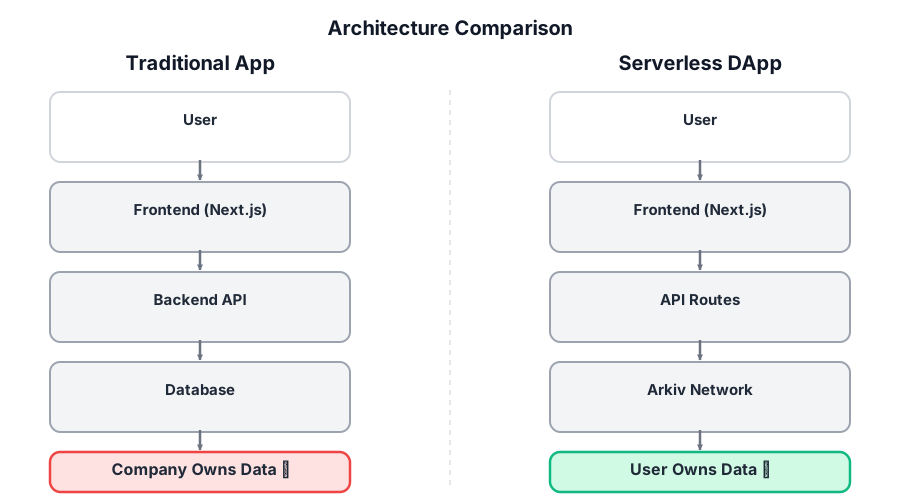
Side-by-side comparison of a traditional app where data is stored in a company database versus a serverless dapp where data is stored on the Arkiv network and owned by the user.
Development Stack Comparison
If you've taken the Vibes to App workshop (by Ramiro Ramirez), you're already familiar with building apps using React, Next.js, and a database. The good news? Most of your stack stays the same. We're just replacing the database layer.
What stays: React for UI, Next.js for framework, TypeScript for types, Vercel for deployment. All your frontend skills transfer directly.
What changes: Instead of PostgreSQL, MongoDB, or Firebase, you use Arkiv, a decentralized database that stores data on the blockchain. The query interface feels familiar, but the data lives on-chain.
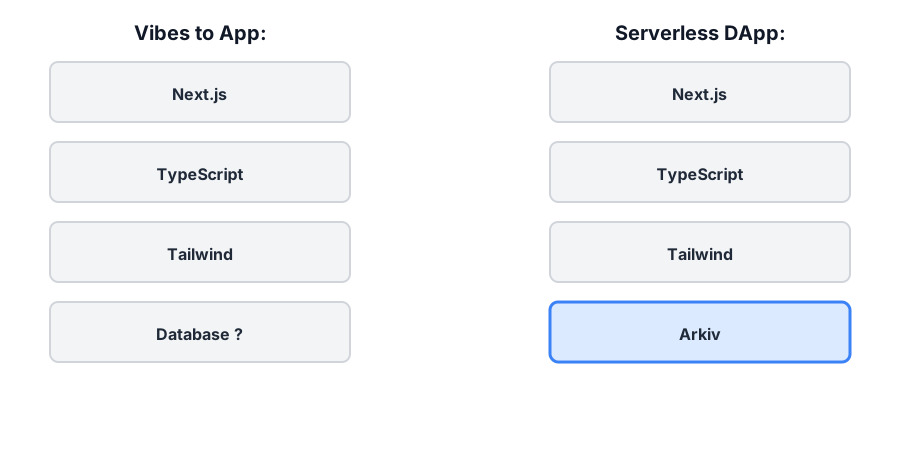
Comparison of the Vibes to App development stack with the Serverless DApp stack, highlighting Arkiv as the new decentralized data layer.
Two Paths, One Destination
This tutorial offers two paths to build your first Arkiv app. Both lead to the same result: a working decentralized application.
🤖 AI-Assisted Path
Use AI coding assistants (Cursor, Copilot, Claude) with provided prompts. Faster if you're comfortable with AI tools.
✋ Manual Path
Follow step-by-step instructions. No AI needed. Great for learning every detail.
Concept Bridges: From Vibes to App to Serverless
If you've taken the Vibes to App - Class 1 workshop, you've learned how to turn app ideas into working applications. This tutorial extends those concepts into the decentralized world.
Vibes to App taught you:
- How to structure an app idea
- Building with React and Next.js
- Using databases to store data
- Deploying to production
Serverless DApp 101 extends this to:
- Decentralized data storage (Arkiv instead of traditional DB)
- User-owned data (not company-owned)
- Blockchain verification (transparent and verifiable)
- True data independence (walkaway test)
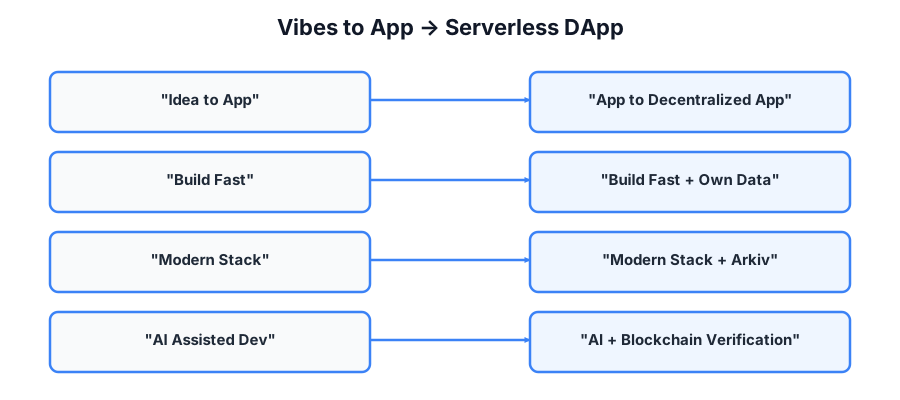
Conceptual progression showing how ideas from the Vibes to App workshop extend into serverless and decentralized application concepts.
Key Takeaways: What Makes a System Serverless
Understanding the difference between "serverless" and "truly fully serverless" helps you make better architecture decisions.
"Serverless" Next.js on Vercel
A "serverless" website is like a restaurant that doesn't own a kitchen. When someone orders food, a kitchen appears, cooks the dish, then disappears. You still get food. You just don't run the kitchen.
A Next.js app on Vercel can feel like a static website, but it's not automatically "no server." It's a blend:
- Some pages are prebuilt and served from a CDN (no code runs per visit)
- Some pages run code on demand (auth checks, personalization, "fetch then render")
- API routes and middleware are server code, just packaged as platform functions
So "serverless apps" plus decentralized data (Arkiv) doesn't remove server-like responsibilities. It moves them into functions, middleware, and client logic.
Truly Fully Serverless Apps
A "truly fully serverless" app means: no privileged backend you control is required for the app to function. Users can load a client and interact with the system using their own keys, and the system's state lives on infrastructure that's public, replaceable, and verifiable.
A system is "fully serverless" if:
- Any user can obtain a client without your infrastructure
- Users can read and write without your servers
- No privileged operator secrets are required
- Core functions remain possible if your org disappears
If any of those fail, it's not "fully serverless," it's "server-minimized."
A practical target you can actually ship: "Walkaway-safe serverless." Your Vercel functions exist only for convenience (caching/proxying). The app remains usable without them. Multiple frontends can exist. Data is verifiable and portable.
Real-World Examples
Real systems in production meet most of the "fully serverless / walkaway-safe" criteria, but no mainstream app yet hits every requirement without tradeoffs. Reality is lumpy. That's instructive.
Systems that are truly serverless exist: BitTorrent, Bitcoin, low-level protocols.
Systems that are usable exist: Ethereum apps with serverless cores, Nostr, ENS plus IPFS frontends.
What no one has fully solved yet:
- Fast, global search without trusted indexers
- Spam-resistant social apps without moderation authorities
- Push notifications without servers
- Mass-market UX without convenience infrastructure
You are not trying to invent something that has never existed. You are trying to compose known working pieces into something that normal users can tolerate, builders can fork, and institutions can't quietly capture. That's a harder problem than "no servers." It's the problem of durable freedom under real constraints.
Section 2: Hands-On Experience
Now let's see how data actually flows through a serverless dapp. These visuals show the mechanics of reading and writing to Arkiv, and how to verify your data on the blockchain.
Data Flow: Writing to Arkiv
When you create a record in your app, here's what happens behind the scenes:
- User Action: You submit a form or trigger an action in your app
- API Route: Your Next.js API route receives the request
- Transaction Creation: The API creates an Arkiv entity with your data
- Signing: The transaction is signed with your private key (wallet)
- Blockchain Submission: The signed transaction is submitted to Arkiv (Braga testnet)
- Confirmation: The transaction is confirmed on-chain (usually within seconds)
- Indexing: Indexers process the transaction (5-30 seconds delay. This is normal!)
- Queryable: Your data becomes queryable and appears in your app
Important: Indexer lag is normal! Your transaction is confirmed on-chain immediately, but it takes a few seconds for indexers to process it. This is why you might need to refresh to see new data. (Source: Arkiv Litepaper - Indexer Architecture)
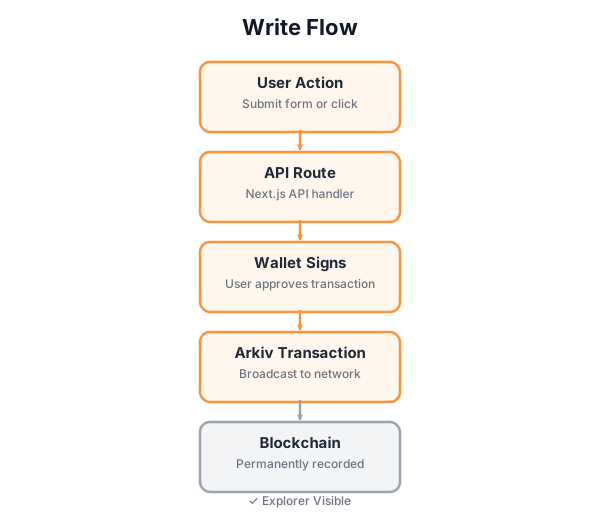
Write flow showing how a user action becomes a signed Arkiv transaction recorded on the blockchain and visible in the explorer.
Data Flow: Reading from Arkiv
Reading data from Arkiv is simpler than writing. No authentication is needed, and it's free!
- Query Request: Your app makes a query request (e.g., "get all messages")
- Indexer Query: The query goes to Arkiv indexers (not the blockchain directly)
- Filtering: Indexers filter entities by your query criteria (type, spaceId, etc.)
- Response: Indexers return matching entities with attributes and payload
- Display: Your app displays the data in the UI
Key Points: Reads are public (anyone can query), free (no gas fees), and fast (served by indexers). Queries use attributes for filtering. Think of them like indexed database columns. (Source: Arkiv Litepaper - Query Interface)

Read flow showing how application data is queried from Arkiv and displayed in the user interface.
Arkiv Entity Structure
Every piece of data in Arkiv is stored as an entity. Understanding entity structure is key to building effective queries.
Entity Components:
- Entity Key: Unique identifier (generated automatically)
- Attributes: Key-value pairs for querying (like indexed columns)
- Required:
type,spaceId - Common:
wallet,created_at - Custom: Any fields you want to query on
- Required:
- Payload: The actual data (JSON, text, binary, etc.)
- Content Type: MIME type (e.g.,
application/json) - Transaction Hash: Links to the blockchain transaction (for verification)
Pro Tip: Use attributes for anything you want to query on. Store complex data in the payload as JSON. Attributes are indexed and fast; payloads are for richer content.(Source: Arkiv Litepaper - Entity Model)

Diagram of an Arkiv entity showing its unique ID, queryable attributes, content payload, and transaction hash used for verification.
The Walkaway Test: Data Independence
The "walkaway test" is a simple but powerful concept: Can your app and data survive if you shut down your server?
❌ Traditional Apps
- Data in company database
- Lost if server shuts down
- Vendor lock-in
- Can't migrate easily
✅ Serverless DApps
- Data on-chain (blockchain)
- Persists independently
- No vendor lock-in
- Rebuild app, same data
Why This Matters: With Arkiv, your data lives on the blockchain, not in a company database. This means you can shut down your server, rebuild your app from scratch, or switch hosting providers. Your data remains accessible. This is true decentralization. (Source: Arkiv Litepaper - Data Persistence)
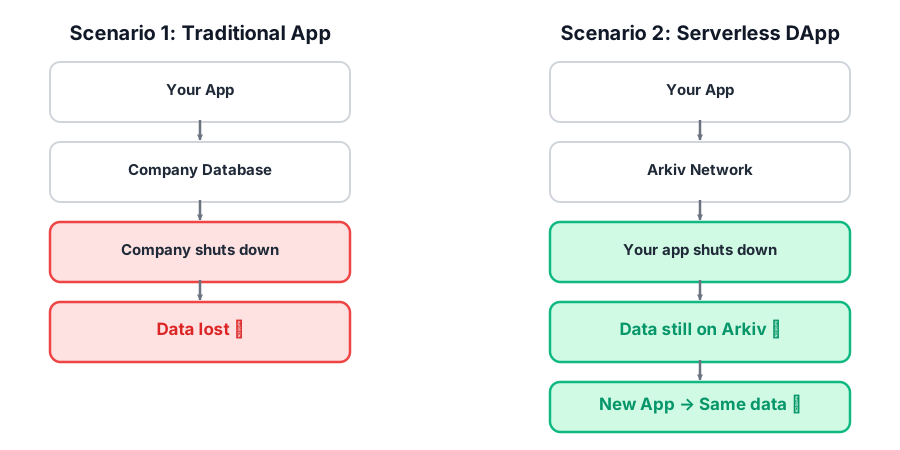
Comparison showing that data stored in a traditional app is lost when the app shuts down, while data stored on Arkiv remains accessible to new applications.
Verification Flow: Blockchain Transparency
One of the most powerful features of blockchain-based data is verifiability. Anyone can verify that your data is actually on-chain.
- Transaction Hash: Every write operation returns a transaction hash
- Explorer Lookup: Use the hash to look up the transaction on the Arkiv Explorer
- On-Chain Verification: The explorer shows the transaction details, block number, and data
- Public Verification: Anyone can verify your data is on-chain (transparency!)
- Immutable Record: Once confirmed, the transaction is permanent and unchangeable
Blockchain Transparency: All Arkiv data is public on-chain. This means anyone can verify your data, see transaction history, and trust that the data hasn't been tampered with. For privacy, use unique space IDs or encrypt payloads.(Source: Arkiv Litepaper - Blockchain Verification)
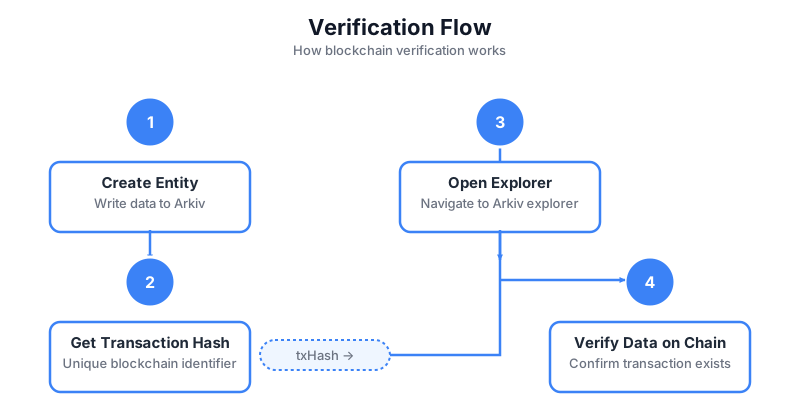
Step-by-step flow showing how a transaction hash is used to verify data on the blockchain using the Arkiv explorer.
Section 3: Building with Arkiv
Now that you understand the concepts, here are tools and patterns to help you build Arkiv apps correctly from day one.
Arkiv Skills for AI Coding Assistants
Arkiv publishes official agent skills that teach your AI coding assistant (Claude Code, Cursor, Copilot, Cline, Windsurf) the current SDK, query patterns, and best practices. Install them once and your agent stops inventing SDK calls or suggesting deprecated chain names.
What's in the skills:
- Current SDK conventions and idiomatic patterns
- Best practices: PROJECT_ATTRIBUTE namespacing, typed attributes, differentiated expirations
- Integration patterns for backend, React, and wagmi/EIP-1193
- Error handling using named SDK error classes
How to install:
npx skills add https://github.com/arkiv-network/skills --skill arkiv-best-practices npx skills add https://github.com/arkiv-network/skills --skill arkiv-feedbackThe second skill (arkiv-feedback) lets you file an issue against the Arkiv team from inside your AI agent with /arkiv-feedback.
Why this matters: Indexer lag is normal (not an error). PROJECT_ATTRIBUTE on every entity and every query. Right-typed attributes (numerics for range queries). Differentiated expiresIn per entity type. These are the patterns the skills enforce automatically.
Best Practices & Patterns
✅ Do This
- Stamp
PROJECT_ATTRIBUTEon every entity and every query - Use the right attribute type: numeric for range queries, string for tags and equality
- Differentiate
expiresInper entity type withExpirationTime.fromDays/fromHours - Use
jsonToPayloadandstringToPayloadfor encoding - Catch named SDK error classes (
EntityMutationError,NoMoreResultsError) - Subscribe with
subscribeEntityEventsinstead of polling - Use
$creator(immutable) for tamper-proof attribution
❌ Avoid This
- Querying without
PROJECT_ATTRIBUTEon a shared testnet - Storing numerics as strings (you lose range queries forever)
- Hardcoded
expiresInseconds instead ofExpirationTimehelpers - Treating indexer lag (5 to 30 seconds) as an error
- Array attributes for many-to-many (use a link entity type instead)
- String-matching error messages (use the named error classes)
- Forgetting that
updateEntityis a full replace, not a patch
These patterns come from the official TS SDK Best Practices page. See the Next Steps section for the full resource list.
Resources & Next Steps
Official Resources
- 📄 Arkiv Litepaper(Source for concepts in this lesson)
- 🌐 Arkiv Network
- 🔍 Arkiv Explorer (Braga Testnet)