Understanding Arkiv (Optional)
Estimated time: 10 minutes
Understanding Arkiv (Optional)
Learning Objectives
By the end of this step, you'll:
- Understand key Arkiv concepts (entities, spaces, attributes)
- Know how queries work
- Understand the difference between reads and writes
- See how Arkiv differs from traditional databases
Content
What is Arkiv?
Arkiv is a decentralized database built on blockchain. It provides:
- On-chain storage: Data is stored on the blockchain
- Query interface: Read data using familiar query patterns
- EVM compatibility: Works with Ethereum wallets and tools
- No vendor lock-in: Your data is independent of any service
📄 Source: These concepts are explained in detail in the Arkiv Litepaper. The litepaper provides deeper context on Arkiv's architecture and philosophy.
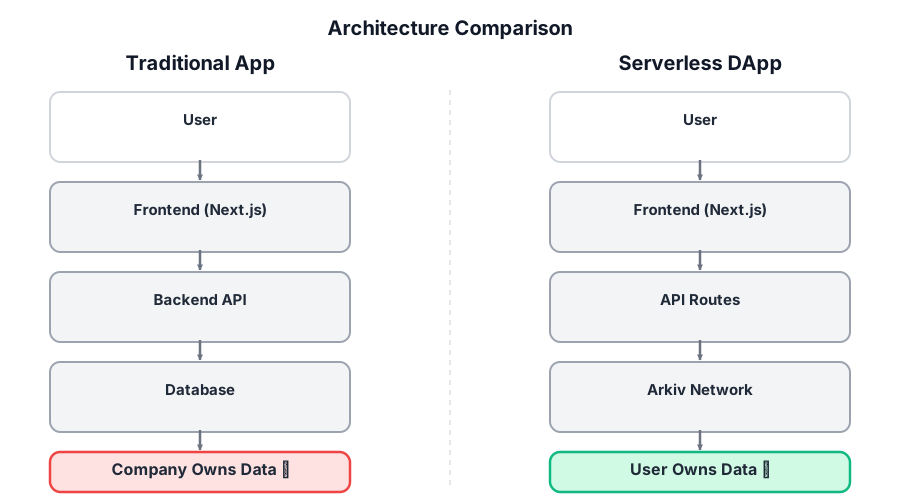
This comparison shows how serverless dapps with Arkiv differ from traditional apps. The most fundamental difference is where and who owns the data. With Arkiv, data lives on-chain, owned by users.
Key Concepts
Entities
An entity is a piece of data stored on Arkiv. Think of it like a row in a database table.
Each entity has:
- Key: Unique identifier (generated automatically)
- Payload: The actual data (can be JSON, text, binary, etc.)
- Attributes: Key-value pairs for querying (like indexed columns)
- Content Type: MIME type of the payload (e.g.,
application/json)

This diagram shows the structure of an Arkiv entity: unique ID, queryable attributes, content payload, and transaction hash for verification. Use attributes for anything you want to query on (they're indexed and fast), and store complex data in the payload as JSON.
Example entity (as returned by buildQuery):
{
  key: "0xabc123...",                   // unique entity key
  owner: "0x742d35...",                 // current $owner (mutable, can be transferred)
  creator: "0x742d35...",               // original $creator (immutable, set at creation)
  createdAtBlock: 12345n,               // bigint
  expiresAtBlock: 12345n + 86400n,
  contentType: "application/json",
  payload: Uint8Array,                  // raw bytes; use e.toJson() to decode JSON
  attributes: [
    { key: "project",     value: "serverless-dapp101" },
    { key: "type",        value: "workshop_message" },
    { key: "createdAtMs", value: 1715652800000 },   // numeric, enables range queries
  ],
}Call entity.toJson() to decode the payload when contentType is application/json.
PROJECT_ATTRIBUTE: the canonical multi-tenant pattern
Braga is a shared, public testnet: every Arkiv app reads and writes against the same global store. The single most important pattern is to define a unique PROJECT_ATTRIBUTE and stamp it on every entity and every query. Look at lib/config.ts:
export const PROJECT_ATTRIBUTE = {
  key: 'project',
  value: 'serverless-dapp101',
} as const;Every Arkiv project you build will start this way. Pick a value globally unique to your project. Without it, your queries return everyone else's data.
Attributes
Attributes are key-value pairs you can filter on. They come in two flavors:
- String attributes support equality (
eq,neq) and glob matching (~,!~). Use for tags, statuses, names, identifiers. - Numeric attributes support equality plus range (
gt,gte,lt,lte). Use for any value you want to sort or filter by range: timestamps, scores, counts, priorities.
If you store priority as the string "5", you lose range queries forever. Always store numerics as numbers.
Two synthetic attributes you always get for free
Every Arkiv entity has two metadata attributes set by the protocol itself, not by you:
$owner: the wallet that currently controls the entity. It is mutable, the owner can transfer ownership withchangeOwnership. Only the current$ownercanupdateEntity,deleteEntity, orextendEntity.$creator: the wallet that originally created the entity. It is immutable, set at creation, never changes, cannot be spoofed. Useful when you need tamper-proof attribution.
You can filter on either with .ownedBy(addr) or .createdBy(addr):
publicClient.buildQuery()
  .where(eq('project', 'serverless-dapp101'))
  .ownedBy('0xabc...')   // entities currently owned by this wallet
  .fetch();

publicClient.buildQuery()
  .where(eq('project', 'serverless-dapp101'))
  .createdBy('0xabc...') // entities originally created by this wallet
.fetch();Queries
You query Arkiv using a builder pattern. Two ways to AND predicates:
// Implicit AND (pass an array)
const result = await publicClient
  .buildQuery()
  .where([eq('project', 'serverless-dapp101'), eq('type', 'workshop_message')])
  .withAttributes(true)
  .withPayload(true)
  .withMetadata(true)
  .limit(100)
  .fetch();

// Explicit AND
.where(and([eq('project', 'serverless-dapp101'), eq('type', 'workshop_message')]))The @arkiv-network/sdk/query module exports nine predicates:
| Operator | Use |
| --- | --- |
| eq, neq | String or number equality |
| gt, gte, lt, lte | Numeric range (string attributes only support equality) |
| and, or | Compose predicates |
| not | Negate a predicate |
Plus asc(field) and desc(field) for ordering. Range query example, find messages from the last 24 hours by createdAtMs:
import { eq, gte, desc } from '@arkiv-network/sdk/query';

const recent = await publicClient.buildQuery()
  .where([
    eq('project', 'serverless-dapp101'),
    gte('createdAtMs', Date.now() - 24 * 60 * 60 * 1000),
  ])
  .orderBy(desc('createdAtMs'))
  .withPayload(true)
  .limit(50)
.fetch();For gte to work, createdAtMs must be stored as a number, not a string.

This diagram shows how queries work: your app makes a query request, which goes to Arkiv indexers. Indexers filter entities by your criteria and return matching results. Reads are public (anyone can query), free (no gas fees), and fast (served by indexers).
Reads vs Writes
Reads (Public Client)
- No authentication needed: Anyone can read public data
- Free: Reading doesn't cost gas
- Fast: Queries are served by indexers
- Use case: Displaying data, searching, filtering
const publicClient = getPublicClient();
const result = await publicClient.buildQuery()...fetch();Writes (Wallet Client)
- Authentication required: Must sign with a private key
- Costs gas: Each write is a blockchain transaction
- Slower: Must wait for blockchain confirmation
- Use case: Creating, updating, deleting data
const walletClient = getWalletClientFromPrivateKey(privateKey);
const result = await walletClient.createEntity({...});Mutations: more than just create
The wallet client exposes a full set of write operations. You are not limited to createEntity:
import { jsonToPayload, ExpirationTime } from '@arkiv-network/sdk/utils';

// Create returns both the entity key and the transaction hash
const { entityKey, txHash } = await walletClient.createEntity({
  payload: jsonToPayload({ text: 'Hello' }),
  contentType: 'application/json',
  attributes: [PROJECT_ATTRIBUTE, { key: 'type', value: 'workshop_message' }],
  expiresIn: ExpirationTime.fromDays(180),
});

// Full replace of payload and attributes (any attribute you omit is dropped)
await walletClient.updateEntity({
  entityKey,
  payload: jsonToPayload({ text: 'edited' }),
  contentType: 'application/json',
  attributes: [PROJECT_ATTRIBUTE, { key: 'type', value: 'workshop_message' }],
  expiresIn: ExpirationTime.fromDays(180),
});

// Delete removes the entity entirely
await walletClient.deleteEntity({ entityKey });

// Extend pushes back the expiration
await walletClient.extendEntity({ entityKey, expiresIn: ExpirationTime.fromDays(365) });

// Batch creates in one transaction
await walletClient.mutateEntities({ creates: [/* ... */] });Two rules to remember:
- Only the current
$ownercanupdateEntity,deleteEntity,extendEntity, orchangeOwnership.$creatoris for attribution only; it gives no write rights. updateEntityis a full replace. It is not a patch. Any attribute you do not include is dropped. Read the current entity first if you only want to change one field.
How It Differs from Traditional Databases
| Traditional Database | Arkiv | |---------------------|-------| | Centralized server | Decentralized (blockchain) | | Vendor lock-in | Independent data | | Private by default | Public by default | | Fast writes | Slower writes (blockchain) | | Requires infrastructure | No infrastructure needed | | Data can be lost | Data persists on-chain |
This comparison highlights the fundamental differences between traditional databases and Arkiv. The key tradeoff is speed for independence: Arkiv writes are slower (blockchain confirmation), but your data is truly independent and verifiable.
Indexer Lag
Indexer lag is the delay between when a transaction is confirmed and when it appears in queries.
- Transactions are confirmed immediately (on-chain)
- But indexers need time to process and index them
- Usually 5-30 seconds on testnet
- This is why you might need to refresh to see new data
Best Practices
- Stamp
PROJECT_ATTRIBUTEon every entity and every query. Always. This is the canonical multi-tenant pattern on a shared testnet. - Pick the right attribute type. Numerics for any value you will range-query (timestamps, counts, scores); strings for tags and identifiers.
- Use
$creatorfor tamper-proof attribution. When you need to prove a write came from a specific wallet, filter with.createdBy(addr)instead of trusting a custom attribute. - Differentiate
expiresInper entity type. UseExpirationTime.fromDays/fromHours/fromMinutes. Ephemeral types live shorter; durable types live longer. - Catch named SDK error classes.
EntityMutationError,NoMoreResultsError,NoCursorOrLimitError,NoEntityFoundError. String-matching error messages breaks on every SDK upgrade. - Handle indexer lag. Confirmations are immediate; query visibility takes 5 to 30 seconds. Refresh or subscribe with
subscribeEntityEvents.
Building with AI Assistants: Arkiv AI Agent Kit
If you're using AI coding assistants (Cursor, Copilot, Claude, etc.) to build Arkiv apps, check out the Arkiv AI Agent Kit. It provides:
- Drop-in LLM context for building Arkiv integrations correctly from day one
- Patterns and prompts that prevent common mistakes
- Best practices enforced automatically (wallet normalization, query shapes, timeout handling)
- Engineering guidelines and checklists
The kit helps AI assistants understand Arkiv's unique characteristics:
- Indexer lag is normal (not an error)
- Immutable history design patterns
- Query shape standardization (type + spaceId + limit)
- Wallet normalization everywhere
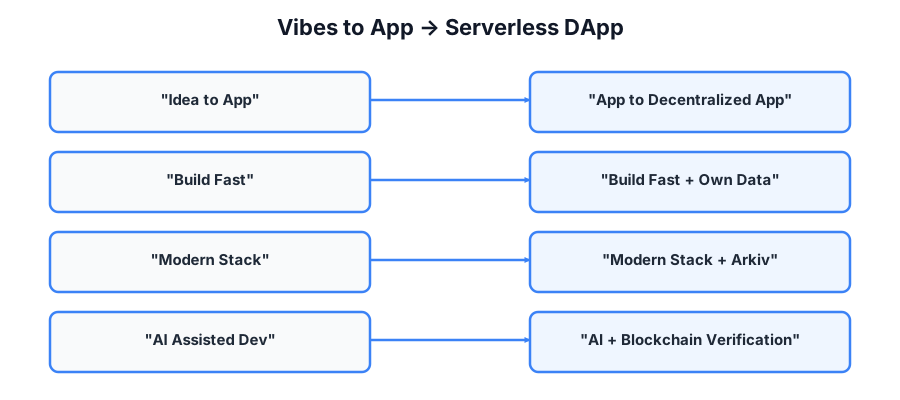
If you've taken the Vibes to App workshop, this visual shows how those concepts extend into the decentralized world. The progression from app ideas to traditional apps to serverless dapps demonstrates how Arkiv builds on familiar development patterns.
🤖 Learn More: See the AI Agent Kit section in the Visual Lesson, or check out the Next Steps section for links to the kit.
I'm at step 8: Understanding Arkiv (Optional).

Help me understand:
1. What entities, spaces, and attributes are
2. How queries work in Arkiv
3. The difference between reads and writes
4. How Arkiv differs from traditional databases
5. Why indexer lag happens

Provide clear explanations with examples from the code we've been using.

Update the internal implementation plan with notes and show me the plan so I can track your progress.✓ Checkpoint
Troubleshooting
Q: Can I update or delete entities?
A: Yes. The wallet client exposes createEntity, updateEntity (full replace of payload and attributes), deleteEntity, extendEntity (push back expiration), changeOwnership, and mutateEntities (batch creates). Only the current $owner can update, delete, extend, or transfer. A common pattern is still to model history as separate entities (audit trail, immutable ledger), but it is no longer a hard constraint.
Q: How do I make data private?
A: Arkiv is public by default. Two options for confidentiality: (1) encrypt the payload bytes client-side before calling createEntity, so only key-holders can decrypt; (2) combine encryption with expiresIn for auto-revoking access. There is no public/private toggle at the protocol level; the encryption layer is yours to design.
Q: What does storing data cost? A: On Braga testnet you pay gas in test GLM, which you get free from the faucet, so for learning purposes it is effectively free. There is no Arkiv mainnet yet, so workshop content stays on Braga. Gas scales with payload size and current network conditions.
Q: How much data can I store? A: There are practical limits based on gas costs. For large files, store a hash on Arkiv and the file on IPFS or similar.
Q: How do I keep my queries from picking up other Arkiv apps' data?
A: Use the PROJECT_ATTRIBUTE pattern. Define a unique constant in lib/config.ts and stamp it on every entity and every query. Without it, your queries return everyone else's data on Braga.
Q: What is the difference between $owner and $creator?
A: $owner is the wallet that currently controls the entity (mutable, can be transferred, controls writes). $creator is the wallet that originally created the entity (immutable, never changes, useful for tamper-proof attribution). Filter on either with .ownedBy(addr) or .createdBy(addr).