Walkaway Test
Estimated time: 5 minutes
Walkaway Test
Learning Objectives
By the end of this step, you'll:
- Understand what the "walkaway test" means
- Experience data persistence without a central database
- See how your app works independently
Content
What is the Walkaway Test?
The "walkaway test" is a simple but powerful concept: Can your app and data survive if you shut down your server?
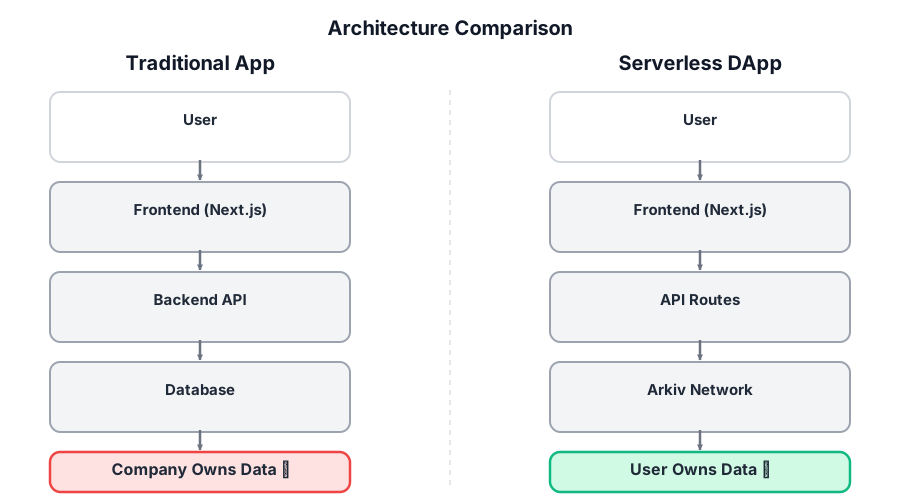
This comparison shows the fundamental difference: in traditional apps, data lives in company databases and is lost if the service shuts down. With Arkiv, data lives on-chain, owned by users, and persists independently.
With traditional apps:
- ❌ If you shut down the database, data is gone
- ❌ If you stop the server, the app is inaccessible
- ❌ You're locked into a vendor's infrastructure
With Arkiv:
- ✅ Your data lives on-chain (independent of your server)
- ✅ Anyone can read your data (it's public)
- ✅ You can rebuild your app from scratch and still access the same data
- ✅ No vendor lock-in
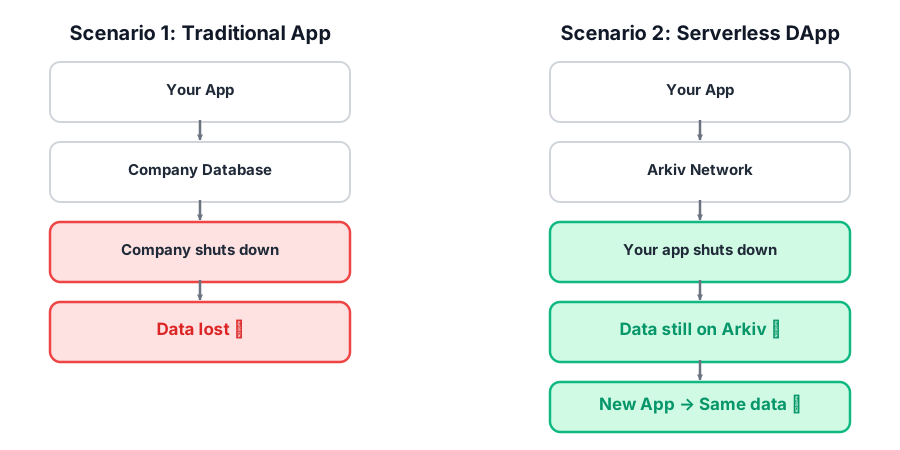
This visual demonstrates data independence: data stored in a traditional app is lost when the app shuts down, while data stored on Arkiv remains accessible to new applications.
Why This Matters
This demonstrates true decentralization:
- Your data doesn't depend on your infrastructure
- Multiple apps can read the same data
- You can migrate between hosting providers easily
- Your data persists even if your app goes offline
I'm at step 7: Walkaway Test.

Help me:
1. Understand what the walkaway test demonstrates
2. Stop my dev server and see that data persists
3. Restart the server and verify data is still accessible
4. Explain why this proves true decentralization

Explain data persistence and independence from infrastructure.

Update the internal implementation plan with notes and show me the plan so I can track your progress.✓ Checkpoint
Troubleshooting
Q: My messages don't appear after restarting.
A: Make sure you're using the same SPACE_ID (should be "ns"). Also, wait a moment for the indexer to catch up, then refresh.
Q: Can I access my data from a different computer?
A: Yes! As long as you use the same SPACE_ID, you can access the data from anywhere. The data is public on-chain.
Q: What if I want private data?
A: You can use a unique SPACE_ID that only you know. While the data is still on-chain and technically public, it's only discoverable if someone knows your space ID.
Q: Does this work in production? A: Yes! This is exactly how production Arkiv apps work. Your data persists independently of your hosting infrastructure.
Q: Can multiple people see my messages?
A: Yes. Every workshop entity is stamped with PROJECT_ATTRIBUTE = { key: 'project', value: 'serverless-dapp101' }, and the API filters every query on that attribute. Anyone running the same workshop app reads the same project, so all participants see each other's messages. In production, pick a value globally unique to your project so you isolate from everyone else on Braga.
Q: Will my messages appear on the deployed hello-world page?
A: Yes, as long as both your local environment and the deployed app use the same PROJECT_ATTRIBUTE value. The deployed page queries for every entity tagged project = 'serverless-dapp101', so messages from all tutorial participants appear together. Queries filter by project attribute, not by wallet address.