Verify on Explorer
Estimated time: 3 minutes
Verify on Explorer
Learning Objectives
By the end of this step, you'll:
- Know how to use the Arkiv blockchain explorer
- Understand the difference between viewing entities and transactions
- Verify both your entity (data) and transaction (blockchain operation) on-chain
- See the data stored in your entities and transactions
Content
What is the Explorer?
The Arkiv Explorer is a blockchain browser - like Etherscan for Ethereum, but for Arkiv. It lets you:
- View all entities (data structures) on Arkiv
- View all transactions (blockchain operations) on Arkiv
- See entity details (key, payload, attributes)
- See transaction details (hash, block, gas, etc.)
- Verify data stored in entities and transactions
- Check wallet addresses and balances
Key Concept: You can view your data from two perspectives:
- Entity view: Shows the data structure (your message, attributes, payload)
- Transaction view: Shows the blockchain operation that created that entity
Why Verify?
Verifying on the explorer proves that:
- Your data is actually on-chain (not just in a database)
- Your transaction was confirmed by the network
- Anyone can independently verify your data
- Your app is truly decentralized
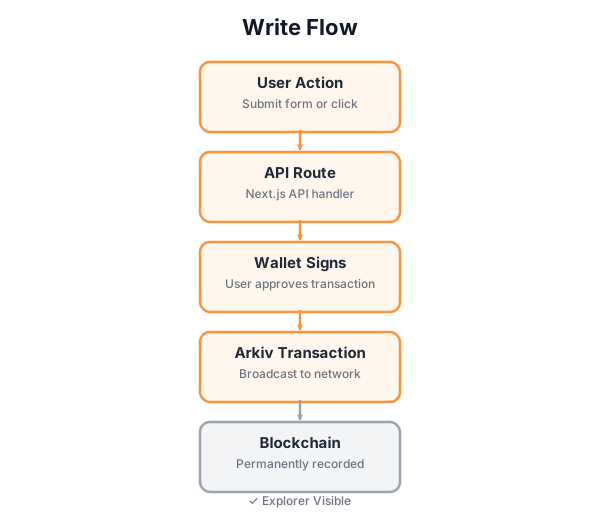
This shows how your write operation flows through to blockchain confirmation. Once confirmed, your transaction hash can be used to verify the data on-chain.
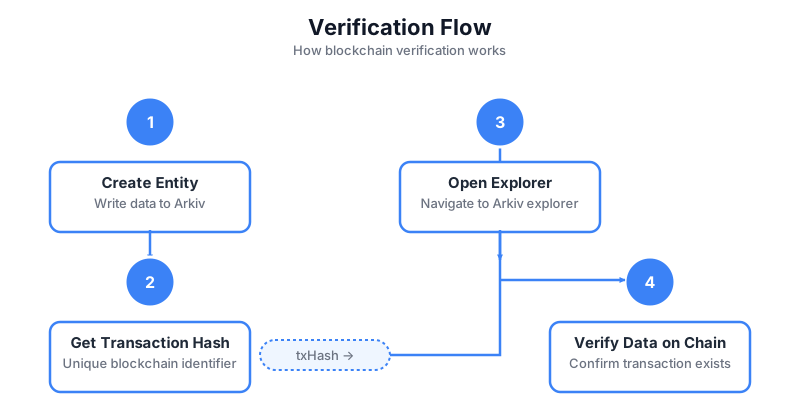
This step-by-step flow shows how to use a transaction hash to verify data on the blockchain using the Arkiv explorer. Every write operation returns a transaction hash, which you can use to look up and verify the transaction on the explorer.
I'm at step 6: Verify on Explorer.

Help me:
1. Find the "View on Explorer" link for my message
2. Understand what I'm seeing on the explorer page
3. Locate my transaction data in the explorer
4. Explain what makes this verification important

Explain blockchain transparency and on-chain verification.

Update the internal implementation plan with notes and show me the plan so I can track your progress.✓ Checkpoint
Troubleshooting
Q: The Entity or Transaction links don't appear. A: The Entity link should appear immediately. The Transaction link only appears after the transaction is indexed. Wait a moment and refresh the page. If it still doesn't appear, check the browser console for errors.
Q: The explorer page shows "Transaction Not Found". A: The transaction may still be pending. Wait a moment and try again. If it persists, check that you're on the correct testnet (Braga).
Q: I can't find my message data in the transaction. A: The data is encoded in the transaction. Look in the "Input Data" or "Logs" section. The explorer may have a decoder that shows the decoded data.
Q: Can I share the explorer link with others? A: Yes! That's the beauty of blockchain - anyone can verify your data by visiting the explorer link. Share it to show your message is on-chain!
Q: What if I want to see all messages from the workshop?
A: The app's /api/serverless-dapp101/messages endpoint queries every entity stamped with the workshop's PROJECT_ATTRIBUTE, so it returns all participants' messages by default. You can also use the explorer to inspect any entity directly via its entity key.